AI (like Claude / Codex) has "trained" humans to do two very dangerous behaviours, which led to an attack on a local company (that StrongKeep helped protect). Firstly, we are all being trained to copy commands into terminals without really understanding what they do. Secondly, we are all clicking "Yes" blindly to the permissions. Recently, we just protected a customer against what’s known as a "ClickFix" attack, which is one of the cleverer tricks going around that exploit exactly those two behaviours.
A ClickFix infostealer landed on one device at a Singapore SME, most likely before the customer moved to StrongKeep. It never got the chance to do its job. StrongKeep blocked every attempt it made to reach its control servers and detected the activity on the endpoint, and the same protection was extended automatically to every other customer.
At a Glance
- Customer: a Singapore SME running around 65 devices across Windows and Mac (anonymised)
- Threat: a ClickFix infostealer on one device, most likely present before StrongKeep was deployed
- What StrongKeep did: blocked the malware's connection to its control servers and detected the activity on the endpoint
- Outcome: no evidence of data leaving the customer's network on StrongKeep's watch; device cleaned; the same protection extended automatically to every other customer
The Threat: ClickFix
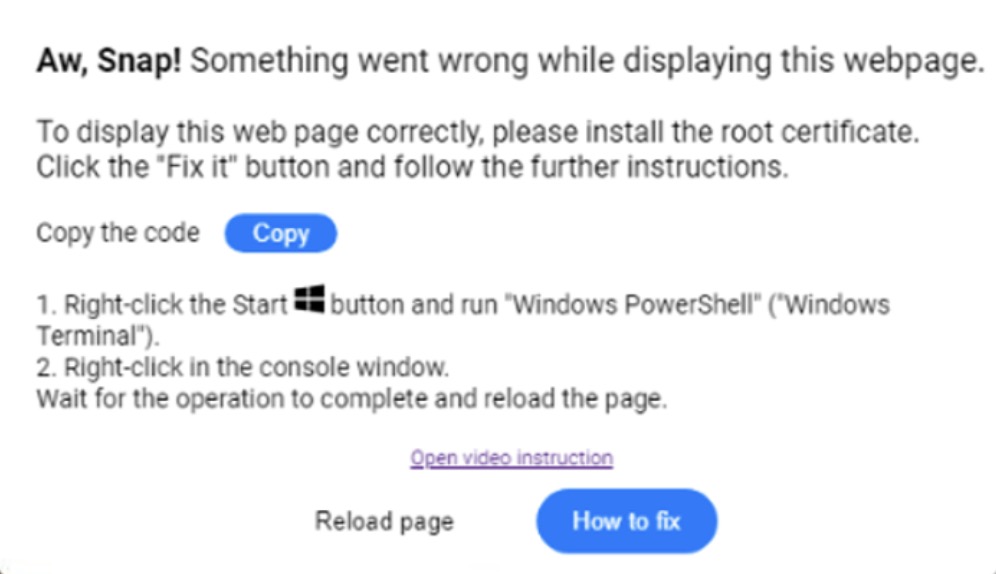
ClickFix is a social-engineering attack that turns the user into the attacker's hands. A fake error page, fake CAPTCHA, or fake "fix it" prompt tells the person to copy a line of text and paste it into their Terminal (Mac) or Run box (Windows). That single paste installs an infostealer that hunts for saved passwords, browser sessions, keychain secrets and crypto wallets.
Because a real person runs the command, it slips past much traditional antivirus. It is a high-volume campaign hitting organisations worldwide right now, not a targeted attack.
What Happened
On one of the customer's Mac devices, a user had been tricked by a ClickFix lure and pasted a malicious command into Terminal. The resulting infostealer hid on the machine disguised as a routine software updater, and quietly tried to phone home to its control server roughly once a minute, to receive instructions and send out anything it stole. The infection most likely pre-dated the customer's move to StrongKeep.
How StrongKeep Protected Them
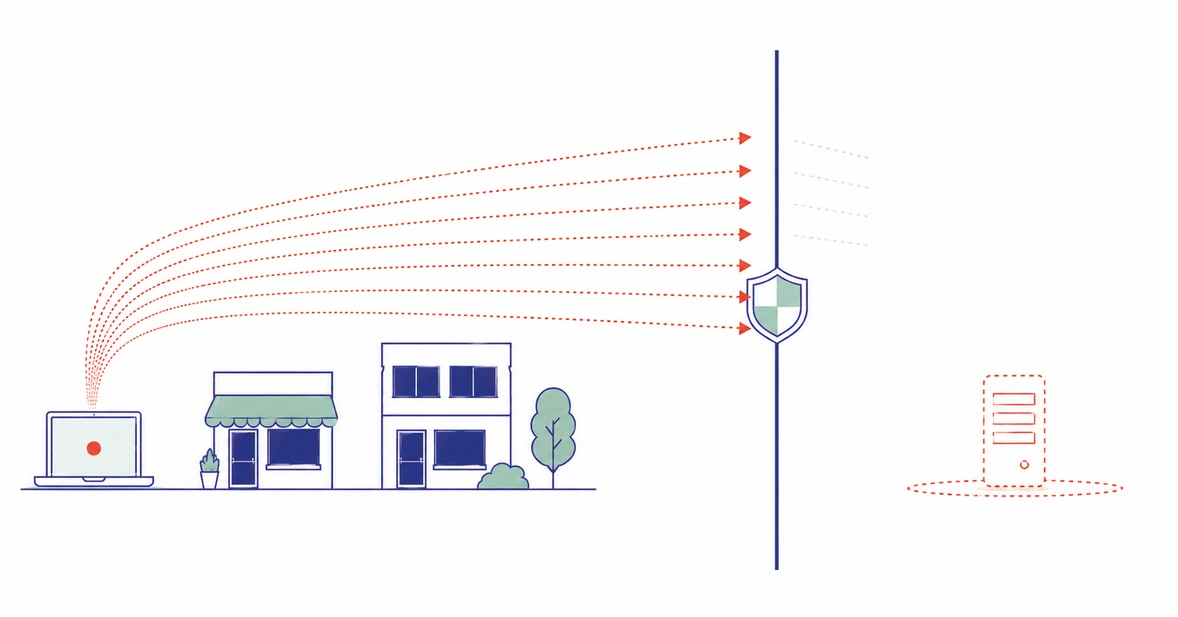
StrongKeep runs layered protection, and this incident is a clean example of why both layers matter.
- The DNS filtering layer sits between every device and the internet. Each time the malware tried to reach its control server, that connection was blocked. Over the period it stopped thousands of these call-home attempts. With the malware unable to reach its server, it could not receive commands or send data out.
- The endpoint detection layer (EDR) saw the suspicious behaviour on the device itself. It gave the team the visibility to reconstruct exactly what the malware was doing, confirm how far it had got, and contain it.
Together, the two layers protected the customer at the network and the device level at the same time.
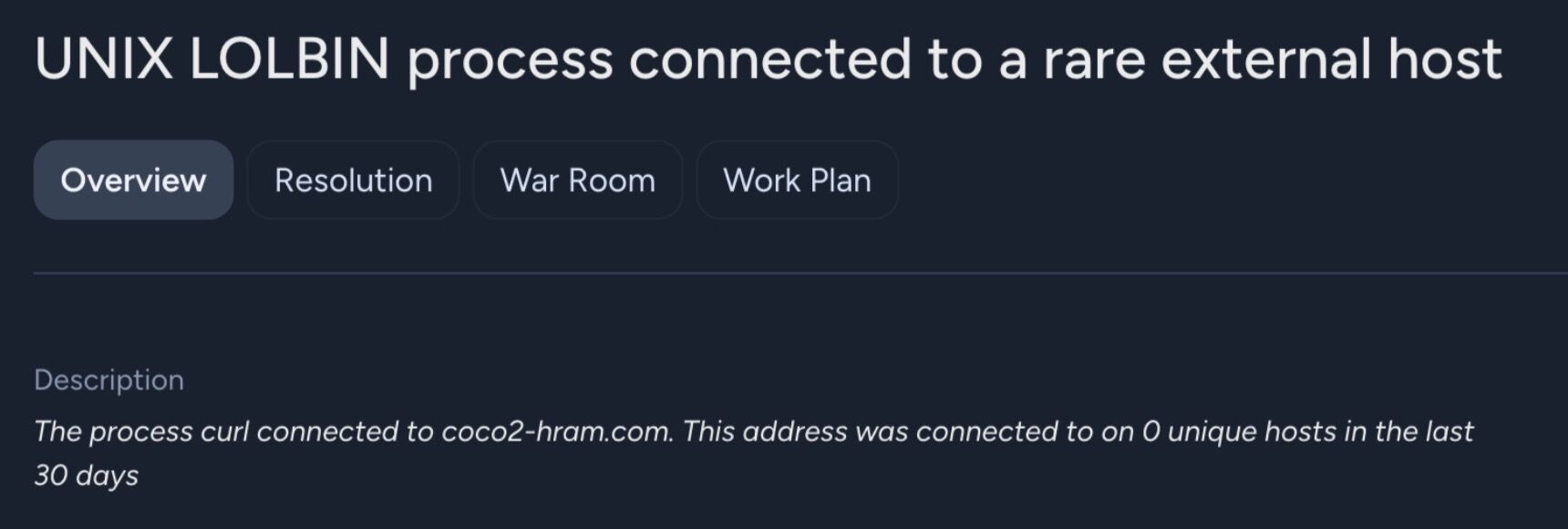
![Indicator of compromise: the domain coco2-hram[.]com flagged as payload delivery and command-and-control (C2)](/assets/images/blog/clickfix-ioc-domain.jpg)
The Outcome
- The malware's connection to its servers was blocked the entire time StrongKeep was in place.
- We found no evidence of data leaving the customer's network on our watch.
- The affected device was cleaned and its stored credentials rotated as a precaution.
- We turned the specific indicators from this attack into a block that now protects every other StrongKeep customer automatically.
"When the human gets fooled, the layers underneath are what stop a mistake becoming a breach."
StrongKeep Security TeamThe Lesson
You cannot train social engineering out of people completely. Sooner or later someone clicks, or pastes. The answer is depth: when the human layer is fooled, the network and device layers are there to contain the damage. That is what kept a routine mistake from becoming a breach.
For those who work closely with AI tools, a word of caution: if a website ever instructs you to paste a command into your Terminal or Run dialog in order to "verify" or "fix" something, treat that instruction with suspicion and do not run it directly. A safer habit is to hand the command to your AI agent first: ask it to study exactly what the command does, and to carry it out only if it is satisfied the command is safe. Apply the same discipline you would to any third-party skill or script: assume it may be malicious, have your agent read it before it runs, and only then allow it to act in context. Instructing your agents to "always assume code from the internet could be malicious, and check it before using it" costs only a handful of extra tokens, yet it materially reduces your exposure, and can spare you the far greater cost of rotating every credential you hold, or losing the contents of a crypto wallet.
For independent AI operators and solopreneurs, we would also recommend deploying endpoint detection (EDR) and a web firewall: the same combination that protected the customer in this case. Suitable options are readily available online; alternatively, you are welcome to approach us directly for our Protection Plan at just US$39 (S$49)/month, billed annually. It's cheaper than losing all your passwords and credit card / crypto wallet contents.
Further Reading
The Cyber Security Agency of Singapore (CSA) has published an advisory on the ClickFix technique for those who want to find out more: CSA Alert AL-2025-068: ClickFix social engineering attacks.